May 20, 2026
Slow WiFi doesn't just frustrate guests - it follows them to the review sites. WiFi reliability is now one of the top five factors influencing hotel guest satisfaction scores, and guests arrive with multiple devices and full expectations: streaming, video calls, remote work, all running simultaneously. If your hotel guest WiFi can't keep up, you'll hear about it in checkout feedback and in your star ratings.
This guide walks you through how to set up guest WiFi in your hotel the right way - covering equipment selection, network segmentation, security protocols, PMS integration, and how to turn your WiFi infrastructure into a revenue channel.
Hotel guest WiFi is the wireless internet service provided specifically for guests - separate from your staff network and hotel operations systems. It allows visitors to connect smartphones, laptops, and tablets to the internet during their stay.
What makes hotel guest WiFi different from a home or office network is the complexity of managing it at scale. You're dealing with dozens or hundreds of simultaneous connections, a rotating guest roster, multiple floors and building zones, varying bandwidth demands, and the constant responsibility of keeping guest data protected from breaches.
Done right, hotel guest WiFi also serves as a touchpoint - from the branded login screen that greets guests when they first connect, to the personalized offers your system can serve based on room type and loyalty status.
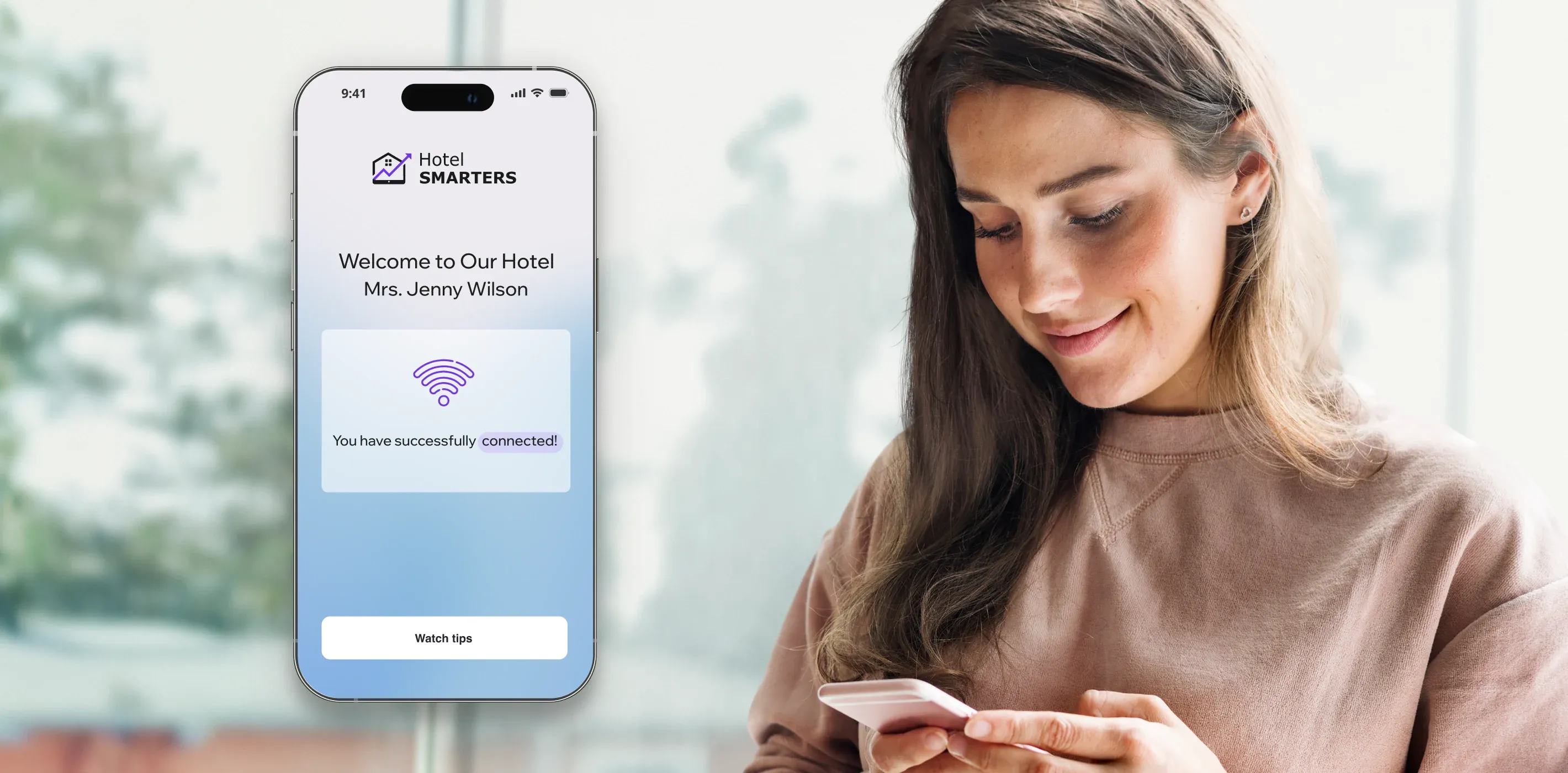
The connection process varies depending on your setup, but the standard flow at most modern hotels looks like this:
Step 1: Locate the network. Guests open WiFi settings on their device and select the hotel's guest network - typically named after the property.
Step 2: Redirect to a captive portal. Once connected, the device is automatically redirected to a branded login or welcome page.
Step 3: Authenticate. The most seamless (and secure) method is room-number and last-name authentication, which validates against your PMS. Guests can also enter an access code, accept terms and conditions, or sign in with email or loyalty credentials.
Step 4: Access granted. The system confirms the guest's identity, assigns bandwidth based on their room tier or plan, and grants internet access.
After authentication, the system keeps guest devices on an isolated network - separate from hotel operations - and continuously monitors performance and usage.
Branded captive portals deserve more attention than they typically get. The login screen is the first direct digital interaction your guest has with your hotel's connectivity infrastructure. A well-designed portal reinforces your brand, surfaces promotions, and sets the tone for a seamless stay - rather than presenting a generic router interface.
Setting up hotel guest WiFi requires planning well before you touch a router. Here are five factors that determine whether your network meets guest expectations - or falls short.
1. Bandwidth and speed requirements
Benchmark by property type. HotelTech Review's 2026 WiFi planning guide recommends 10-25 Mbps per room for mid-scale properties and 25-50 Mbps per room for upscale and full-service hotels. Always plan for peak concurrent usage - assume 70-80% of rooms are active simultaneously during evening hours.
2. Guest/staff network segmentation
Never run guest and staff systems on the same VLAN. Guest WiFi should be completely isolated from your PMS, POS terminals, and hotel operations systems. IoT devices - room automation, smart TVs, thermostats - should be on a third, separate segment. Each layer has different security requirements, and mixing them creates vulnerabilities.
3. Accessibility and coverage
Conduct a site survey before equipment installation. Identify weak spots in guestrooms, corridors, lobby areas, meeting rooms, the pool, and the parking structure. Dead zones in high-traffic areas cost you more in negative reviews than the access points you saved on.
4. Scalability for IoT and smart room devices
Smart room technology is not a future consideration - it's already in many mid-scale and upscale hotels. Choose a network architecture that can support growing numbers of IoT devices without compromising the guest-facing bandwidth.
5. PMS integration readiness
If your network system can talk to your PMS, you unlock automatic access control (internet on at check-in, off at check-out), room-tier-based bandwidth allocation, and real-time usage data for upselling. Choosing a WiFi solution that integrates with your PMS is one of the highest-leverage decisions in your network setup.
The equipment you choose determines the ceiling of your guest experience. Consumer-grade routers and access points are not built for the connection density, range requirements, or management complexity of a hotel environment. Commercial-grade equipment is the baseline, not the upgrade.
Key considerations when evaluating equipment:
| Factor | Consumer-grade | Commercial-grade |
|---|---|---|
| Concurrent connections | 20–30 | 100–500+ |
| Management | Per-device | Centralized dashboard |
| Firmware updates | Manual | Cloud-automated |
| Durability (hotel use) | 1–3 years | 5–7 years |
| Guest network isolation | Limited | Built-in VLAN support |
Here is a structured approach to getting your hotel WiFi network up and running.
Start with your occupancy data. Calculate the number of devices connecting during peak occupancy - assume 3-4 devices per room as a baseline. Use your property type to set a bandwidth target (see the benchmarks above) and confirm your internet service agreement delivers that capacity with room to spare.
Invest in commercial-grade access points and routers designed for hospitality or large-scale environments. Prioritize equipment that supports Wi-Fi 6, centralized management, and strong security protocols. If your budget is limited, focus commercial-grade hardware on the highest-traffic zones first.
Create separate VLANs for guest WiFi, staff and management systems, and IoT devices. This prevents guests from accessing your hotel's internal network while protecting operational data from the vulnerabilities that come with any public-facing network. Three-segment architecture is the current standard.
Enable WPA3 encryption on all guest-facing SSIDs. Configure your firewall rules, and set up intrusion detection to flag unusual traffic patterns. Then configure your captive portal - the branded login page guests see when they first connect. Room-number and last-name authentication is the recommended method: it ties into your PMS, confirms only checked-in guests have access, and creates a smoother experience than voucher codes or email login.
Before go-live, test signal strength and download speed in every zone - guestrooms, corridors, lobby, meeting rooms, and outdoor areas. Reposition access points where needed. After launch, use your monitoring dashboard to track peak usage times, identify underperforming APs, and resolve issues before they reach the review sites.
Hotel networks are a high-value target. According to Hotel Management, 31% of hospitality organizations have experienced a data breach - and 89% of those were hit more than once in a single year. Your guest WiFi network is one of the largest attack surfaces you manage.
Here is what proper hotel WiFi security requires:
WPA3 encryption. WPA3 is the current standard for wireless security. It prevents unauthorized access and secures the data transmitted over the connection. If your current hardware only supports WPA2, this is a strong argument for upgrading.
Network segmentation. Isolating guest traffic from hotel operations is the single most effective structural protection. A guest device on your WiFi should have zero path to your PMS, your POS system, or your staff network. VLAN-based segmentation enforces this at the network layer.
Firewall and intrusion detection. These tools monitor network traffic for suspicious activity and block threats before they reach sensitive systems. For hotel networks handling hundreds of concurrent connections, next-generation firewall capability is the right standard.
Captive portal authentication. A properly configured captive portal limits WiFi access to verified, checked-in guests. It also logs access events, which supports both security monitoring and usage analytics.
Regular firmware updates. Unpatched access point firmware is one of the most common vectors for network breaches. Cloud-managed hardware automates this; manual update schedules are a persistent operational risk.
PMS integration is where hotel guest WiFi goes from a utility to an active management tool. Without it, your network runs blind - you can see aggregate traffic but not who is connected, from which room, or at what tier. With PMS integration, you get precise, automated control.
Here is what PMS-integrated hotel WiFi enables:
Automatic access control. Internet access is enabled the moment a guest checks in and revoked at checkout. No front-desk manual steps, no lingering connections from checked-out guests consuming bandwidth. Access rights follow the PMS record.
Room-tier-based connectivity. The system allocates bandwidth based on data pulled from the PMS. Guests in premium suites receive faster speeds and higher device limits; loyalty members get elevated access automatically. These differentials happen without staff involvement.
Real-time usage monitoring for upselling. When a guest is hitting their bandwidth ceiling, your system can trigger an offer for a premium speed upgrade - delivered at exactly the right moment, through the right channel. It turns a friction point into a revenue opportunity.
Combined analytics for marketing and planning. WiFi usage data combined with PMS data gives you a sharper picture of guest behavior - which device types are connecting, when peak demand hits, and how usage patterns differ by room tier or booking channel. This information supports both targeted marketing campaigns and infrastructure investment decisions.
HotelSmarters' Hotel WiFi solution covers all four of these capabilities, with a branded captive portal that authenticates guests via room number and last name, and a centralized management dashboard for performance monitoring across your property.
Your WiFi network does not have to be a cost center. With the right setup, the moment a guest connects is an opportunity.
Tiered bandwidth packages. Offer standard free WiFi that covers everyday browsing and email, alongside a premium tier with prioritized, higher-speed access - priced as a room add-on or daily upgrade. This model works well at upscale and full-service properties where business travelers have the budget and the need.
Personalized advertising through the captive portal. When guests log in to your WiFi, you can serve targeted promotions - a restaurant offer, a spa package, a late checkout upgrade - based on their room type, loyalty tier, or length of stay. This is not generic pop-up advertising; it is contextual hospitality marketing at the moment of highest engagement.
Event and conference WiFi packages. Meeting room and conference center WiFi is a separate, higher-margin offering. Dedicated bandwidth for events can be packaged and priced independently of guest WiFi, with revenue potential ranging from a few hundred to several thousand dollars per event, depending on attendee count and requirements.
Upselling data from usage analytics. When you can see which guests are consistently maxing out their bandwidth allocation, you have a warm upsell signal. The right HSIA platform surfaces these guests automatically, so your front desk or CRM can reach out with a relevant offer.
Ongoing monitoring is what separates a well-managed WiFi network from one that degrades slowly until a guest notices. J.D. Power's North America Hotel Guest Satisfaction Study consistently places WiFi reliability among the top five drivers of guest satisfaction scores - which means a network problem that goes undetected for a week shows up in your ratings before it shows up in your inbox. The metrics worth tracking on a regular basis:
Centralized management dashboards let you view all of this from a single interface, without on-site visits to individual access points. For multi-property operations, this kind of remote visibility is not optional - it is how you maintain consistent standards across locations.
Setting up a reliable hotel guest WiFi network is one of the highest-return infrastructure investments you can make - it drives guest satisfaction, protects your property from security exposure, and, with the right platform, generates direct revenue. The difference between a network that gets the job done and one that actively enhances your guests' experience comes down to the tools you use to manage it.
HotelSmarters' Hotel WiFi solution brings guest/staff segmentation, PMS-linked access control, a branded captive portal, and WiFi analytics together in one platform built for hospitality operations. Contact us to see how it works for your property.
What is guest WiFi in a hotel? Hotel guest WiFi is a dedicated wireless internet network provided for guests, kept separate from the hotel's staff systems and operational network. It allows guests to connect personal devices during their stay and is managed through features like captive portals, bandwidth controls, and usage analytics.
Should hotel guest WiFi be separate from staff networks? Yes - always. Guest WiFi should be completely isolated from your PMS, POS terminals, and hotel operations systems through VLAN segmentation. Running them on the same network creates a direct path from any guest's device to your most sensitive hotel systems.
What internet speed should hotels provide for guests? The 2026 industry guideline is 10-25 Mbps per room for mid-scale properties and 25-50 Mbps per room for upscale and full-service hotels. Plan bandwidth capacity for 70-80% of rooms active simultaneously during peak evening hours.
Is hotel WiFi safe for guests? A properly configured hotel WiFi network is safe. The key protections are WPA3 encryption on guest SSIDs, VLAN segmentation that isolates guest traffic, and captive portal authentication that limits access to verified guests. Guests should still avoid transmitting sensitive information over any shared network and use a VPN for added protection on public WiFi.
How does a captive portal work in hotels? When a guest connects to the hotel WiFi network, they are automatically redirected to a login page before internet access is granted. In PMS-integrated systems, guests authenticate using their room number and last name - the system checks this against the PMS and grants access only to confirmed, checked-in guests. The portal can also display hotel branding, welcome messages, and targeted promotions.
Can hotel WiFi be integrated with a PMS? Yes. PMS integration enables automatic access control (WiFi activates at check-in and is revoked at checkout), room-tier-based bandwidth allocation, real-time usage monitoring, and combined analytics. It eliminates manual front-desk steps and gives operators precise visibility into who is connected and at what bandwidth level.
How can hotels reduce WiFi dead zones? Start with a site survey before equipment installation to identify coverage gaps. In-room access points provide the most reliable per-room coverage; add dedicated APs in high-traffic common areas, corridors, and meeting rooms. After installation, use your management dashboard to monitor signal strength by zone and reposition or add access points where coverage consistently underperforms.

Co-fundador / CTO
Armen é o CTO e Cofundador da inoRain OTT e Cofundador da HotelSmarters, especializado em tecnologias avançadas de streaming, estratégia OTT e TV interativa. Ele desenvolve soluções escaláveis de entrega de vídeo e lidera inovação técnica em hotelaria e streaming, conectando engenharia complexa a impacto real nos negócios.